Features
Bot traffic
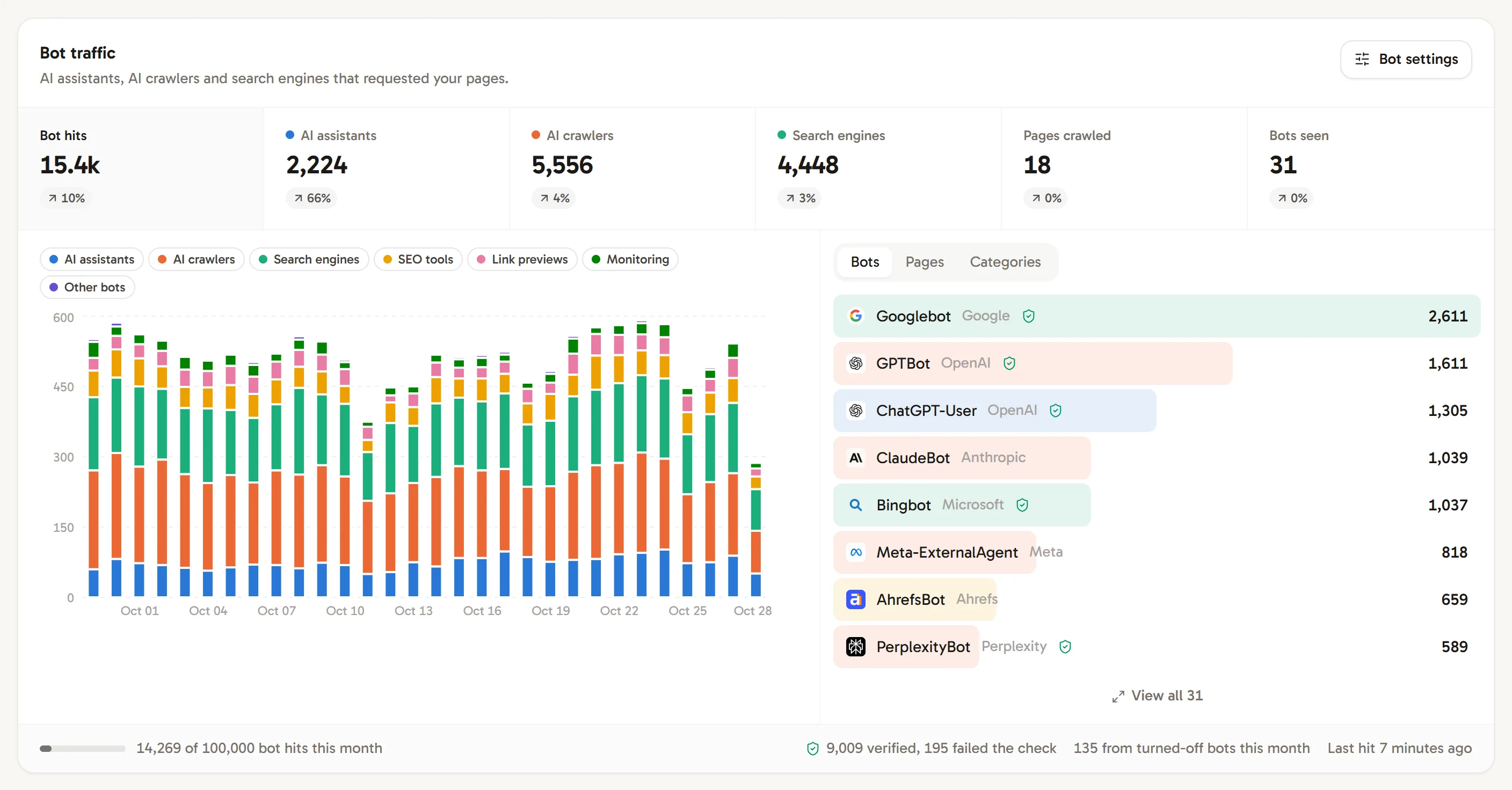
See which AI assistants, AI crawlers, search engines and other bots read your pages by forwarding their requests from your server, CDN or edge to Revfaro.
In short
Bots don't run JavaScript, so the tracking script never sees them. A few lines of middleware on your server or CDN forward bot requests to Revfaro after the response has gone out, and the Bot traffic card shows which AI assistants (ChatGPT, Claude, Perplexity), AI crawlers, search engines, SEO tools, link previews and monitors read which pages. Bot hits don't count toward your monthly events; each website records up to 100,000 a month.
On this page
What bot traffic shows
The Bot traffic card on your dashboard groups bots into categories:
| Category | Examples |
|---|---|
| AI assistants | ChatGPT-User, Claude-User, Perplexity-User: open a page when someone asks an assistant about it |
| AI crawlers | GPTBot, OAI-SearchBot, ClaudeBot, PerplexityBot, CCBot, Bytespider: collect pages to train AI models or build AI search |
| Search engines | Googlebot, Bingbot, Applebot and others |
| SEO tools | Backlink and site audit crawlers |
| Link previews | Slack, LinkedIn, WhatsApp and other apps building link previews |
| Monitoring | Uptime and performance checks |
| Other bots | Scripts, archives and unknown crawlers |
For each bot and each page you see the hits, the change since the previous period and when it was last seen. Before the first real bot request arrives, the card shows setup instructions and links instead of metrics. A successful server check shows that the connection works, but does not count as bot traffic. Use Check again to refresh the card after connecting your server or CDN.
Set up bot tracking
Open Website settings › Bots. The three steps there have your own API key and code.
Add your API key to the server
Copy the API key from Add your API key to the server and store it as
REVFARO_API_KEYin your server's environment. Never put it in browser code. Workspace owners, admins and website managers can see the key.Forward bot requests
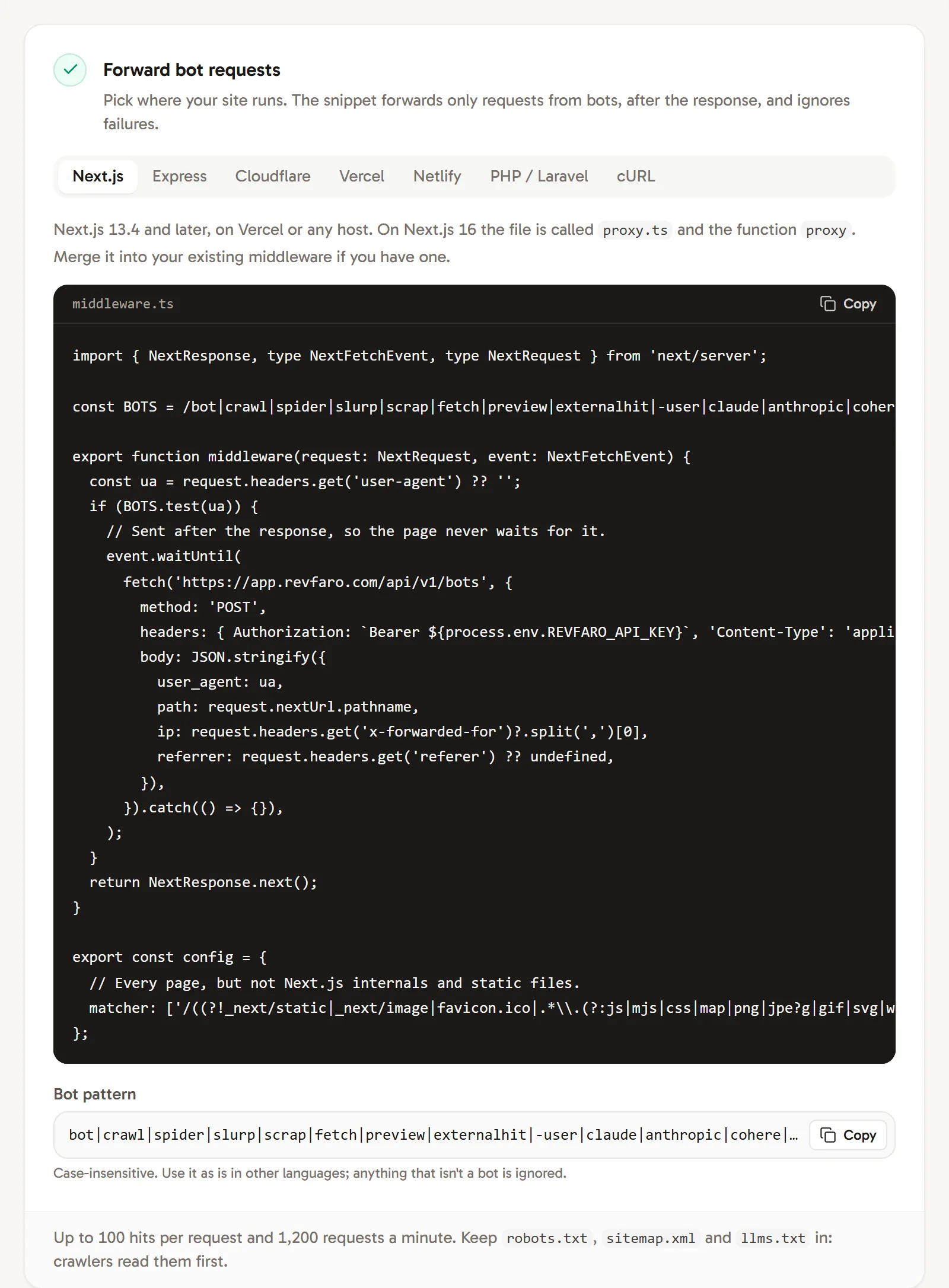
Under Forward bot requests, pick where your site runs: Next.js, Express, Cloudflare, Vercel, Netlify, PHP / Laravel or cURL for any other stack. Each snippet:
- forwards only requests whose user agent matches the bot pattern,
- skips images, scripts, fonts and other static files, but keeps
robots.txt,sitemap.xmlandllms.txt, which crawlers read first, - sends the hit after the response has gone out and ignores errors, so pages never wait for Revfaro.
The Next.js version, for example, is a
middleware.ts(calledproxy.tson Next.js 16) that you merge into your existing middleware. Copy the exact code from the Bots tab; it has the right endpoint and pattern.Check that it works
Request a page of your own site as the setup-check bot:
Terminalcurl -A "RevfaroBot/1.0 (setup check)" https://example.com/Within seconds, Check that it works says Received from your server (click Check again). The check is never counted as bot traffic. Send test hit checks only Revfaro's side, without your middleware. Real bot hits appear in the dashboard's Bot traffic card when you refresh it.
Send bot hits from any stack
The cURL tab shows the raw request. Send one hit, or up to 100 at once as an array, for example to import an access log:
curl -X POST https://revfaro.com/api/v1/bots \
  -H "Authorization: Bearer $REVFARO_API_KEY" \
  -H "Content-Type: application/json" \
-d '{"user_agent":"<the request User-Agent>","path":"/pricing","status":200,"ip":"<the bot IP>"}'user_agentandpathare required.pathcan be a path or a full URL; only the path is kept, without the query string.status(the HTTP status you answered),ip,referrerandtimestamp(up to 7 days old, ISO 8601 or Unix milliseconds) are optional.- Requests from browsers are ignored, so a broad pattern is fine. The case-insensitive pattern used by the snippets is shown under Bot pattern in the Bots tab.
Turn off bots you don't need
Under Turn off bots in Website settings › Bots, switch off whole categories (Whole categories), a company (for example ByteDance) or single bots (Companies and bots). Choose Seen on this site or All known bots to turn some off before they arrive, then click Save changes.
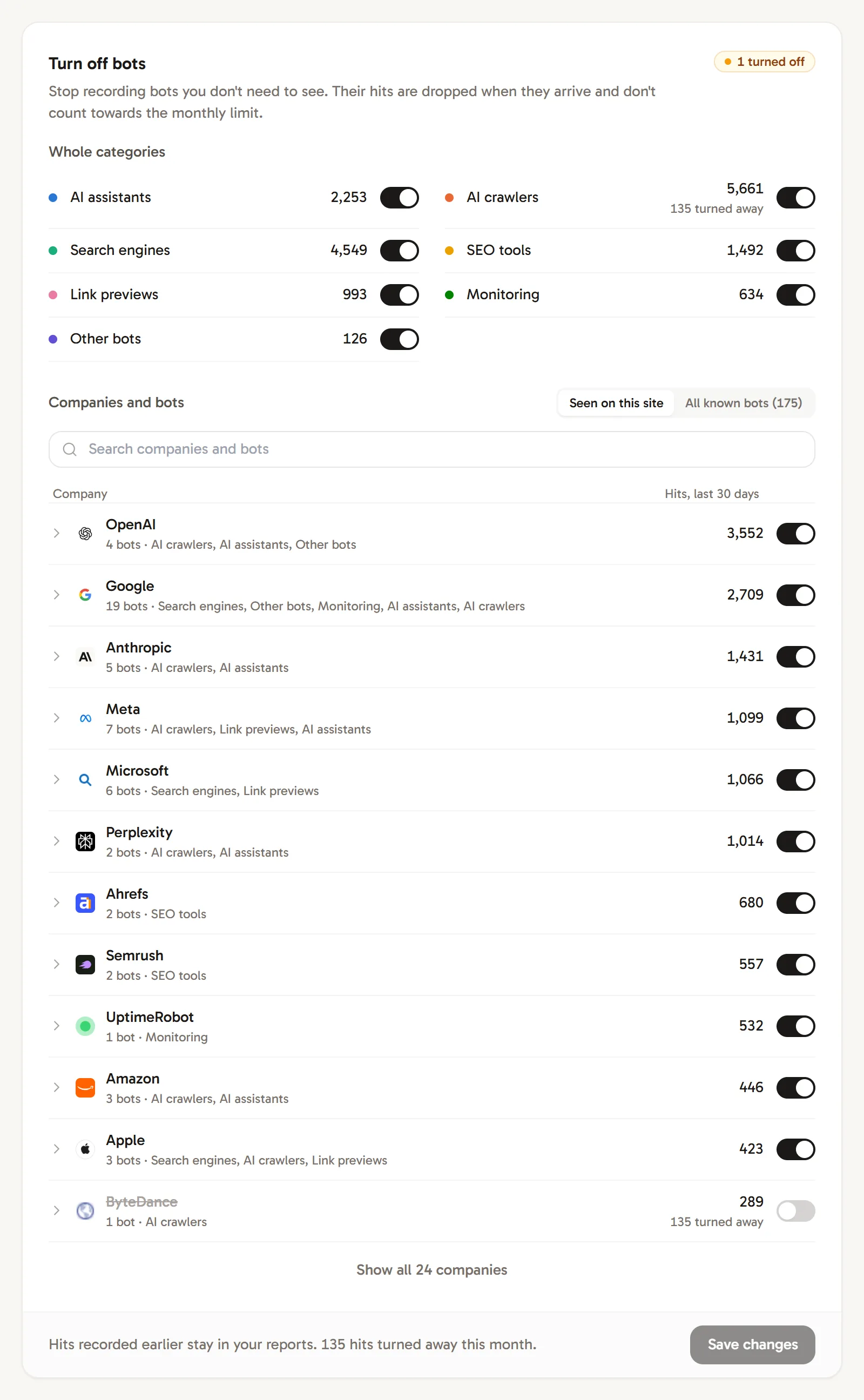
Hits from turned-off bots are dropped when they arrive, aren't stored and don't count toward the monthly limit. Hits recorded earlier stay in your reports. Workspace owners, admins and website managers can change these switches.
Limits
- Bot hits don't count toward your plan's monthly events.
- Each website records up to 100,000 bot hits per calendar month (UTC). Later hits are dropped until the 1st, and the Bots tab shows Monthly limit reached.
- The API accepts up to 1,200 requests a minute per website, with up to 100 hits each.
Privacy
Revfaro keeps the bot's name, owner and category, the path (without query string) and the status code. User agents and IP addresses aren't stored; the IP address is only used to verify search engine and AI crawlers.
Frequently asked questions
Why can't the tracking script see bots?
Bots and AI crawlers fetch your HTML without running JavaScript, and the script also drops automated browsers on purpose so they never count as visitors. Bot traffic has to be recorded where the request arrives: on your server, CDN or edge.
Does bot tracking slow down my website?
No. Each snippet forwards the request after the response has been sent, ignores errors, and only forwards requests whose user agent looks like a bot.
Do bot hits count toward my plan?
No. Bot hits have their own limit of 100,000 per website per calendar month (UTC), and bots you turn off don't count toward it.
How does Revfaro know a bot is really Googlebot or GPTBot?
When you forward the bot's IP address, hits claiming to be Google, Bing, Apple, Yandex, Baidu, Amazon, Huawei Petal or Yahoo crawlers are checked by forward-confirmed reverse DNS, and OpenAI and Perplexity bots against the address lists those companies publish. The card shows how many passed and how many failed.