Revenue attribution
Connect Dodo Payments
Send Dodo Payments payments and refunds to Revfaro with a webhook, pass the visitor to checkout sessions and payment links, and split one account across several websites.
In short
Add a webhook in Dodo Payments for payment.succeeded and refund.succeeded pointing to your website's Revfaro address and paste its signing secret into Connect payments › Dodo Payments. Pass the visitor in the checkout session's metadata and set a return_url on your site; payment links on your pages are tagged by the script automatically. Selling several products from one Dodo account? List each website's product IDs.
On this page
You need a Dodo Payments account and a website in Revfaro with tracking installed. Open Website settings › Setup, go to Connect payments and choose the Dodo Payments tab: it shows these steps with your own webhook address.
These steps work with the script or npm SDK. With npm, initialize tracking on
checkout and return pages, and use your shared tracker.attribution() instead of
window.revfaro?.attribution?.() in browser examples. The SDK does not create a window global.
Add the webhook in Dodo Payments
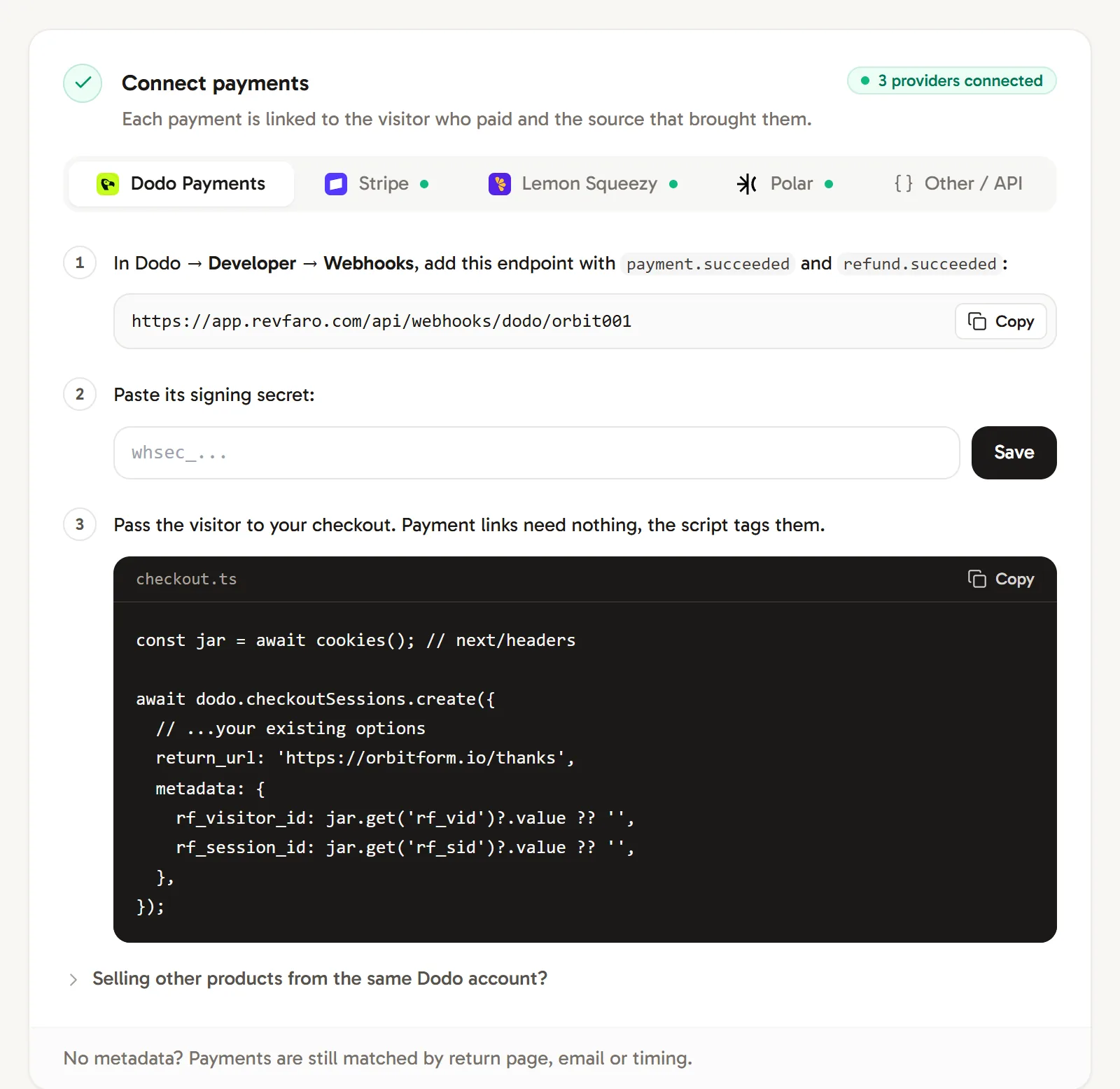
In Dodo Payments, go to Developer › Webhooks and add an endpoint with your website's address from the Dodo Payments tab:
https://revfaro.com/api/webhooks/dodo/YOUR_SITE_IDSubscribe it to
payment.succeededandrefund.succeeded. Add it in live mode, so test payments don't count as revenue.Paste the signing secret
Copy the endpoint's signing secret (it starts with
whsec_), paste it into Paste its signing secret and click Save. The tab shows Connected.Pass the visitor to your checkout
When your server creates a checkout session, add the visitor's cookies as metadata and set a return URL on your site:
checkout.tsconst jar = await cookies(); // next/headers await dodo.checkoutSessions.create({ // ...your existing options return_url: 'https://example.com/thanks', metadata: { rf_visitor_id: jar.get('rf_vid')?.value ?? '', rf_session_id: jar.get('rf_sid')?.value ?? '', }, });Keep any metadata you already send and add these two keys.
Using payment links
Payment links need no code. The script adds metadata_rf_visitor_id and metadata_rf_session_id to every checkout.dodopayments.com link on your pages, including links added later by your own scripts.
Because that metadata doesn't always reach the payment, also give your payment links a return URL on your site (for example https://example.com/thanks). Dodo Payments adds ?payment_id=… to it, and Revfaro links the payment to the visitor who lands there. The return page must load the script and must not be excluded.
Redirecting to a payment link from JavaScript (window.location = …) instead of a normal link? Add the parameters yourself:
const { rf_visitor_id, rf_session_id } = window.revfaro?.attribution?.() ?? {};
const url = new URL('https://checkout.dodopayments.com/buy/pdt_xxx');
if (rf_visitor_id) {
  url.searchParams.set('metadata_rf_visitor_id', rf_visitor_id);
  url.searchParams.set('metadata_rf_session_id', rf_session_id);
}
window.location.href = url.toString();
One Dodo account, several websites
If you sell different products on different websites from one Dodo Payments account, each website's webhook receives every payment. Revfaro learns which product belongs to which website from checkout links and return pages, so most payments are placed automatically.
- To decide it yourself, open Selling other products from the same Dodo account? in the Dodo Payments tab, list the website's product IDs (such as
pdt_abc123, pdt_def456) and click Save. Payments for those products count for this website. Renewals of a subscription already recorded here also count when Dodo omits its product list. - Payments Revfaro can't place yet appear under Payments waiting for a site, with their product (or payment ID when Dodo supplies no product), count and amount. They are placed automatically once a buyer comes from one of your websites, or you can click Count for a website to assign them now.
What Revfaro records
- Payments from
payment.succeeded, with the amount, currency and customer. - Refunds from
refund.succeeded, as negative amounts. A refund that arrives first waits for its payment. Refunds in the buyer's currency are scaled to the original payment's settlement amount. - Currency: when Dodo Payments reports a settlement amount in your website's revenue currency, that amount is used. Other currencies stay in the payment history but are excluded from site totals.
Payments without a visitor ID are still matched when possible; see how payments are matched.
Dodo subscription payments can omit product_cart. Revfaro also checks product_id, a nested subscription product and earlier payments with the same subscription ID. If no site can be determined, assign the payment under Payments waiting for a site.
For older payments recorded without the original currency conversion details, resend the original payment.succeeded webhook from Dodo before a refund in another currency can be applied. Revfaro keeps that refund waiting instead of guessing an exchange rate.
Assigning pending payments to a website requires a workspace owner or admin. A website manager can configure its integration, but cannot resolve pending payment ownership across websites.
Frequently asked questions
Do Dodo Payments payment links work with Revfaro?
Yes. The script adds metadata_rf_visitor_id and metadata_rf_session_id to every checkout.dodopayments.com link on your pages. That metadata doesn't always reach the payment, so also set a return URL on your site, where Dodo adds ?payment_id=.
I sell several products from one Dodo account on different websites. Which website gets a payment?
Revfaro learns which product belongs to which website from checkout links and return pages. You can also list each website's product IDs under Selling other products from the same Dodo account?. Payments it can't place wait under Payments waiting for a site until you assign them.
Which amount does Revfaro use for payments in another currency?
When Dodo Payments reports a settlement amount in your website's revenue currency, Revfaro uses it. Otherwise its original amount is kept, and it is excluded from totals in another currency.