Features
Share cards and embeds
Turn your Revfaro numbers into an image for social media, a ready-to-post text, or a live card embedded on your website that updates itself.
In short
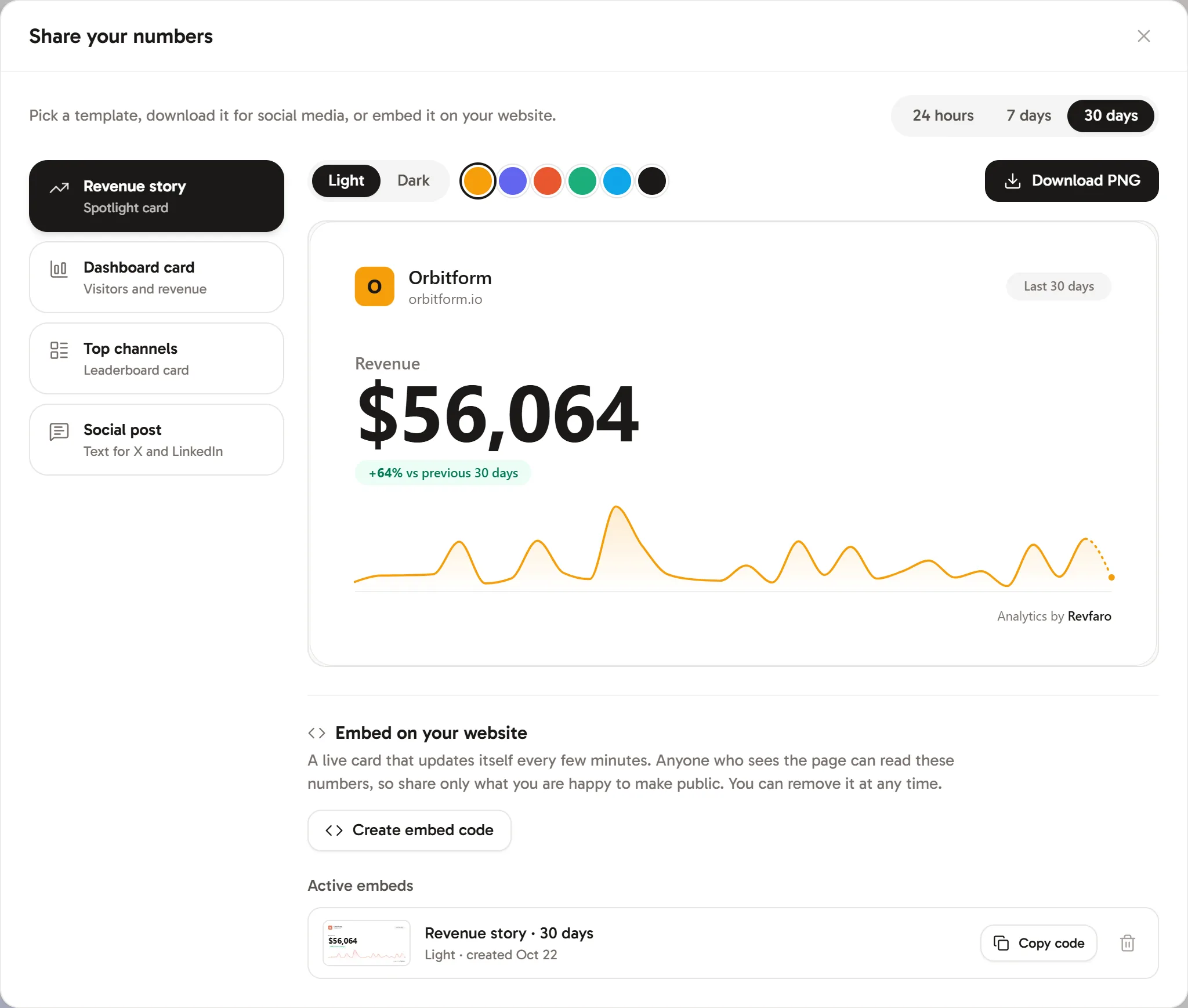
Click Share on a dashboard to open Share your numbers. Pick a period and a template (Revenue story, Dashboard card, Top channels or Social post), choose a light or dark theme and an accent colour, then Download PNG for social media or Create embed code for a live card on your website. Embeds are public images that refresh every few minutes and can be removed at any time.
On this page
Open the share dialog
On a website's dashboard, click Share at the top right. The Share your numbers dialog opens.
Pick a period
Choose 24 hours, 7 days or 30 days at the top right.
Pick a template
- Revenue story: a spotlight card on your revenue. Shown when your plan includes revenue attribution.
- Dashboard card: visitors and revenue with a chart.
- Top channels: a leaderboard of your top channels.
- Social post: ready-made text for X and LinkedIn instead of an image.
Style it
For image cards, choose a Light or Dark theme and one of the accent colours. The preview updates as you go.
Download or embed
Click Download PNG for a sharp 2400 × 1260 image, sized for social media. Or create a live embed for your website (next section).
Embed a live card on your website
Under Embed on your website, click Create embed code and copy the HTML. Paste it into any page, blog post or site builder block that accepts HTML:
<a href="https://revfaro.com/?ref=embed" target="_blank" title="Revenue analytics by Revfaro">
  <img
    src="https://revfaro.com/api/public/share/EMBED_ID.svg"
    alt="Acme stats, analytics by Revfaro"
    width="600"
    height="315"
    loading="lazy"
    style="max-width:100%;height:auto;border-radius:16px"
  />
</a>
The card is an image that Revfaro redraws every few minutes, so it always shows recent numbers for the period you picked. A small "Analytics by Revfaro" line comes with it.
Active embeds lists every embed of the website with its template, period and theme. Use Copy code to get its HTML again, or the trash button to remove it. A removed embed shows "This card is no longer available" wherever it was pasted. Each website can have up to 20 active embeds.
Post your numbers as text
The Social post template writes a short summary of the period, such as visitors and revenue with their change and your top channel. Edit it under Post text, then click Copy text, Post on X or Share on LinkedIn.
Frequently asked questions
Is an embedded card public?
Yes. Anyone who can see the page with the embed can read the numbers on the card, so share only what you are happy to make public. Remove the embed and the card stops showing.
How often does an embedded card update?
Every few minutes. Cards are cached for up to 10 minutes.
Who can create embeds?
Workspace owners, admins and website managers. Everyone with access to the website can download images and copy the social post text.