Tracking
Exclude traffic
Keep your own visits, office IP addresses, countries, staging hostnames and private pages out of your Revfaro statistics and your monthly event count.
In short
Open your site once with ?rf_ignore=true in every browser you use to leave out your own visits. For everyone else, Website settings › Tracking › Exclusions drops events from chosen IP addresses, countries and hostnames, or on chosen pages. Excluded events are never stored and don't count toward your monthly events; past data is not changed.
On this page
Ignore your own visits
Open any page of your website with ?rf_ignore=true added to the address, for example:
https://example.com/?rf_ignore=trueDo this once in each browser you use (and on your phone). From then on, that browser sends nothing to Revfaro. To count yourself again, open a page with ?rf_ignore=false.
The flag is saved in that browser's local storage for your site, and only because you asked for it. It works with both the standard and the cookieless script. Clearing your browser data removes it.
Exclusion rules
For traffic that isn't yours, or that comes from many browsers, open Website settings › Tracking and scroll to Exclusions. Add rules to any of the four lists, then click Save exclusions.
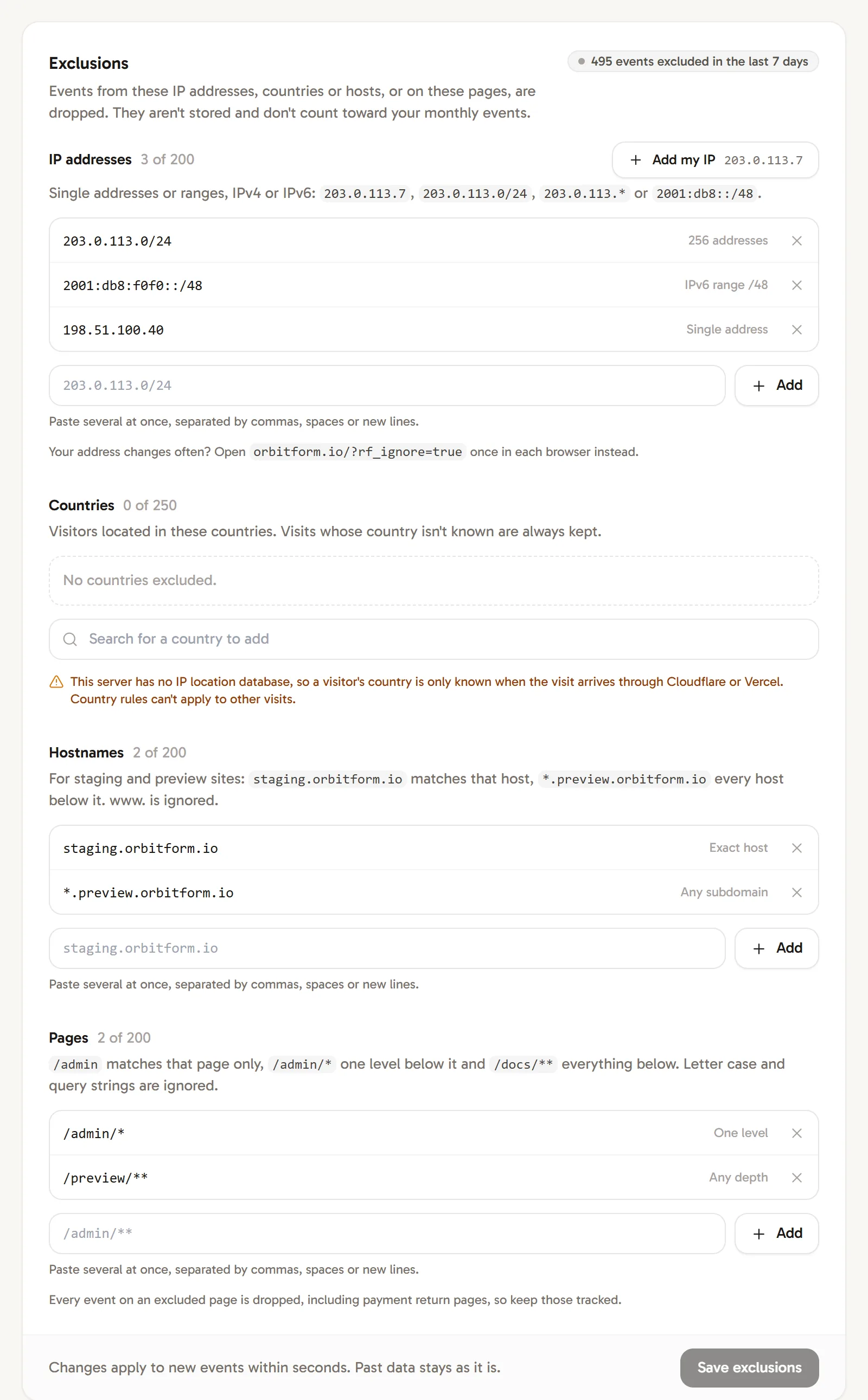
- Events matching any rule are dropped for every visitor and both scripts.
- They aren't stored and don't count toward your monthly events.
- New rules apply to new events within seconds. Past data stays as it is.
- The card shows how many events were excluded in the last 7 days.
- Workspace owners, admins and website managers can change exclusions.
You can paste several entries at once, separated by commas, spaces or new lines.
IP addresses
Up to 200 single addresses or ranges, IPv4 or IPv6:
| Example | Matches |
|---|---|
203.0.113.7 |
One IPv4 address |
203.0.113.0/24 |
A range in CIDR notation (256 addresses) |
203.0.113.* |
The same range, written with a wildcard |
2001:db8::1 |
One IPv6 address |
2001:db8::/48 |
An IPv6 range |
Add my IP adds the address you are using right now. Ranges can be at most /8 wide for IPv4 and /16 for IPv6. If your address changes often, use ?rf_ignore=true instead.
Countries
Search for a country and pick it from the list; add as many as you need. The country is the same one your Country report shows. Visits whose country isn't known are always kept.
Hostnames
Up to 200 hostnames, for staging and preview deployments that load the same script:
staging.example.commatches that host only.*.preview.example.commatches every host below it, but notpreview.example.comitself.
www. is ignored, as in the Hostname report. Only hosts of your website's domain can be added; other domains are never recorded anyway.
Pages
Up to 200 page rules. * matches anything within one part of the path, and ** matches anything across parts:
| Rule | Matches | Doesn't match |
|---|---|---|
/admin |
/admin, /admin/ |
/admin/users |
/admin/* |
/admin/users |
/admin, /admin/users/42 |
/docs/** |
/docs/intro, /docs/guides/setup |
/docs |
/blog/*/edit |
/blog/hello/edit |
/blog/a/b/edit |
Matching ignores letter case, query strings and a trailing slash. If you paste a full page address, Revfaro keeps just its path.
What about bots?
Bots and automated browsers are never counted as visitors, so you don't need rules for them. To see which AI assistants and crawlers read your pages, or to stop recording some of them, see Bot traffic.
Frequently asked questions
How do I stop Revfaro from counting my own visits?
Open any page of your site with ?rf_ignore=true at the end of the address, once in each browser you use. Undo it with ?rf_ignore=false. If your IP address doesn't change, you can also add it under Exclusions with Add my IP.
Do excluded events count toward my plan?
No. Excluded events are dropped when they arrive, before they are stored or counted.
Do exclusions remove data I already have?
No. Exclusions apply to new events within seconds. Visits recorded before you added a rule stay in your reports.