Features
Journeys and visitor profiles
See every payment with the buyer and the source that brought them, browse your visitors, and open a profile with every visit, page and goal before a purchase.
In short
The Journey tab lists the payments of the selected period with the buyer, the source credited, the amount and how long they took to buy. The Users tab lists your visitors. Click anyone to open their Visitor profile, a timeline of every visit with its source, the pages they viewed, the goals they completed and their payments.
On this page
The Journey tab: who paid, and why
On a website's dashboard, open Journey in the conversions card (next to Goals, Funnel and Users). Each row is a payment in the selected period:
| Column | Meaning |
|---|---|
| Visitor | The buyer, with location, device, operating system and browser. Customer marks a first purchase, Returning a renewal. |
| Source | The source credited for the payment, with the campaign or ref tag when there was one, and how the payment was matched when it wasn't by visitor ID. |
| Spent | The amount. |
| Time to complete | Time from their first visit to the payment, and how many visits it took. |
| Completed at | When they paid, in the website's timezone. |
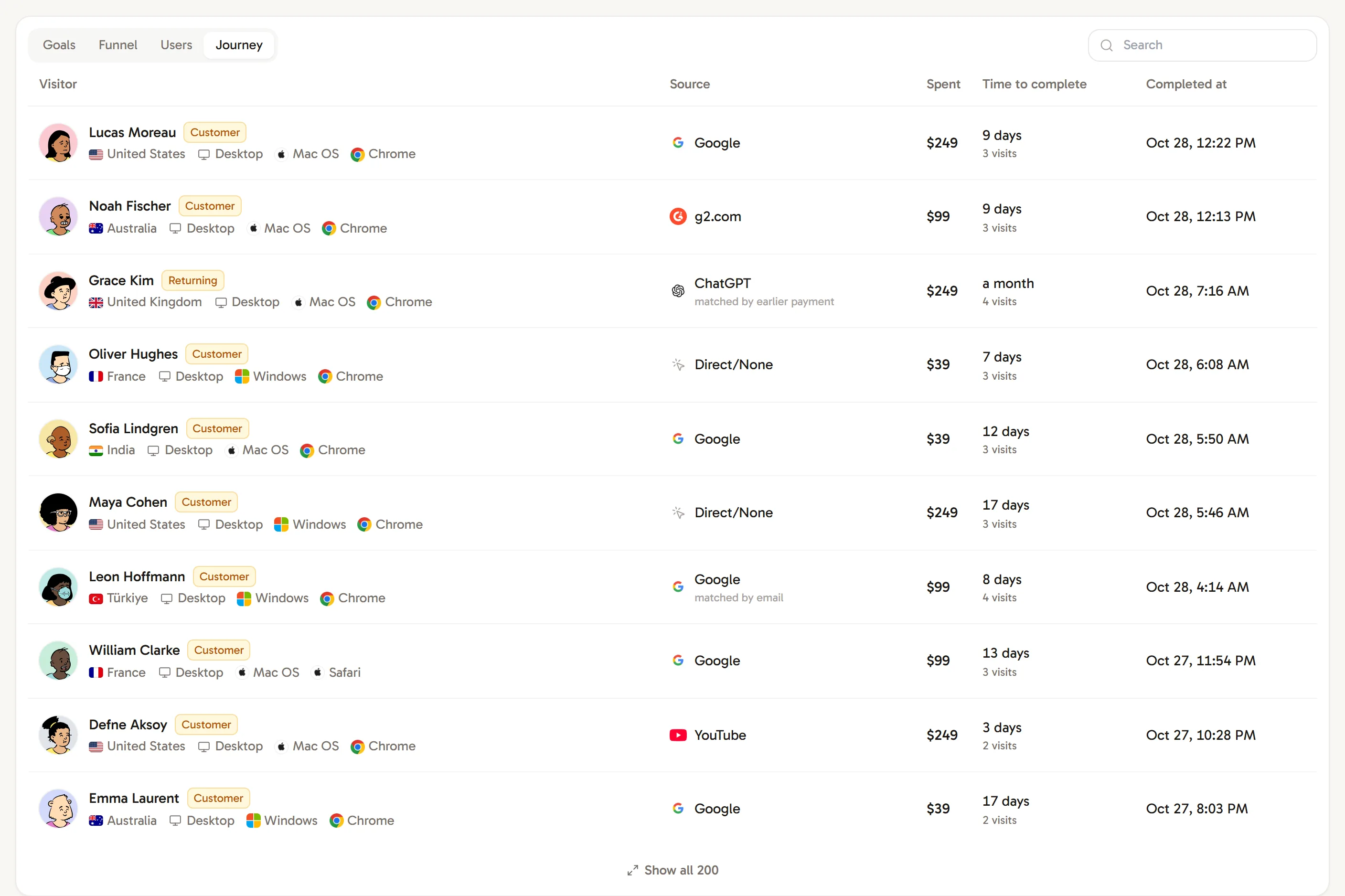
Use the search box to find a buyer by name, email, source, campaign, country or city. The first 10 rows are shown; Show all lists the rest.
Payments not linked to a visitor
A yellow note shows how many payments in the period aren't linked to a visitor yet. Workspace owners, admins and website managers can click Try matching again to run the matching once more for older payments; Revfaro reports how many matched and why the others didn't. Why? opens the website's setup, where you can add a return page. See how payments are matched.
The Users tab: your visitors
Users lists the visitors of the selected period with their first Source, number of Visits, Pages viewed, engaged Time, money Spent and when they were Last seen. Paying visitors carry a Customer badge.
The visitor profile
Click a row in Journey or Users to open the Visitor profile:
- the visitor's name (or nickname), location, device, operating system and browser,
- First source, number of Visits, Total spent and Time to first payment,
- a timeline of every visit, newest first: when it started, its source and referrer, any
campaignorreftag, and how long it lasted, - inside each visit, every page viewed, goal completed (with the page it happened on), outbound link clicked, payment and refund, with times.
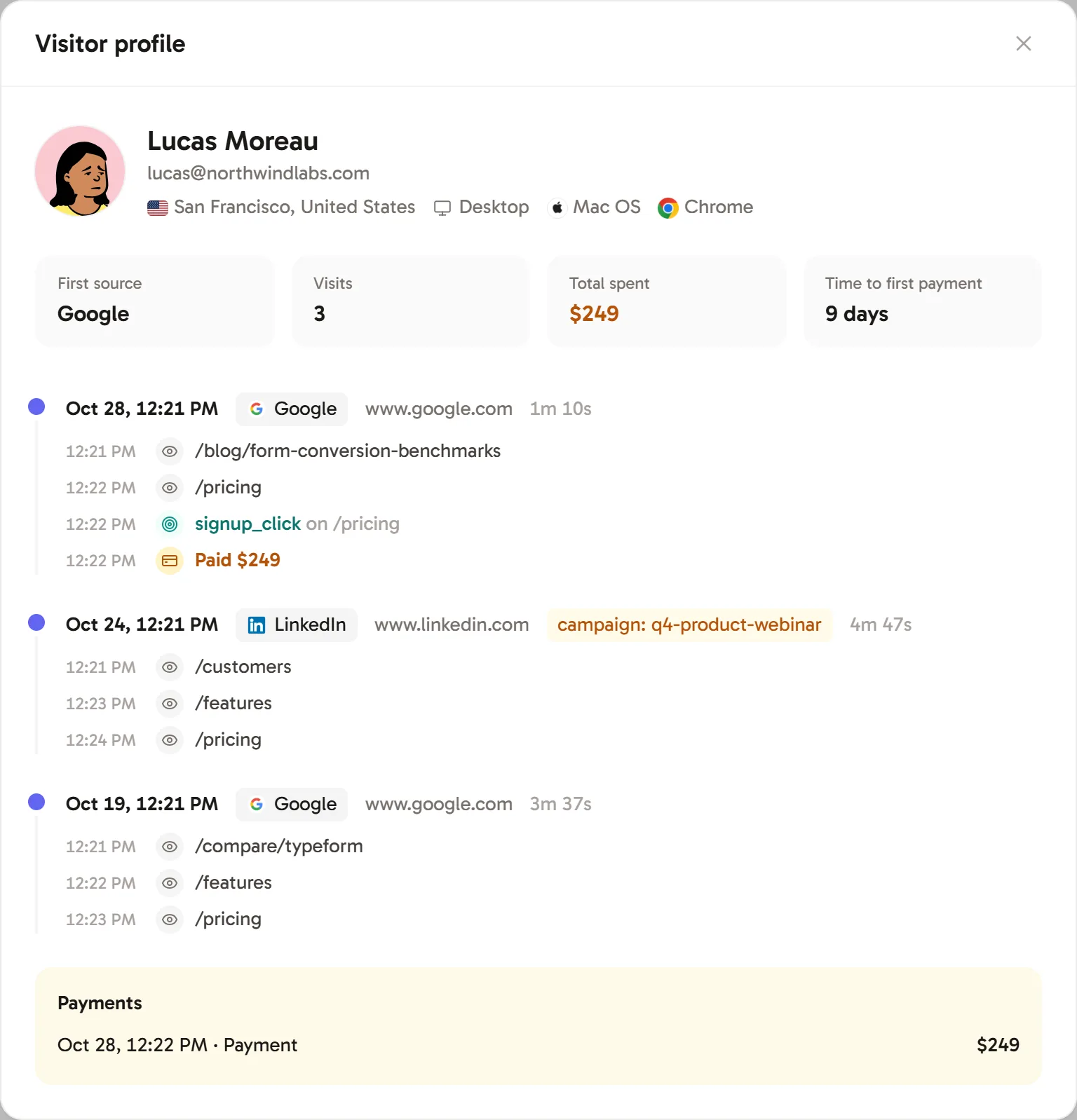
Profiles are a fast way to learn how customers really find and evaluate your product: which article they read first, how many times they came back, and what finally made them buy.
Privacy
Profiles show only what the script records (pages, sources, goals, approximate location, device type and browser) plus the name and email you choose to send with identify. IP addresses and full user agents are never stored. See Privacy and data.
Frequently asked questions
Why does a payment say Not attributed?
Revfaro couldn't find the buyer: the checkout carried no visitor ID, and the return page, an earlier payment, an identified email and checkout timing didn't match either. Set up the return page for your provider, identify signed-in users, then click Try matching again.
What do names like "teal fox" mean?
Anonymous visitors get a stable, generated nickname and an illustrated avatar, so you can tell them apart. Once you identify a visitor, their real name or email is shown instead.
What does Time to complete mean?
The time between the buyer's first visit to your website and their payment.