Tracking
Funnels
Build funnels from pages and goals in Revfaro to see how many visitors reach each step, in order, and where they drop off before converting.
In short
A funnel is a list of 2 to 10 steps, each a page (with * wildcards) or a goal. Revfaro counts the visitors who completed the steps in order during the selected period and shows how many continued and how many dropped off at each step. Workspace owners, admins and website managers create funnels in the Funnel tab of the dashboard; funnels are included in plans with the Funnels feature.
On this page
Create a funnel
Open the Funnel tab
On the website's dashboard, find the card with Goals, Funnel, Users and Journey, and open Funnel. If the website has no funnels yet, the form opens right away; otherwise click New funnel.
Name it and add steps
Give the funnel a name, then set each step to Page or Goal and type its value:
- Page: a path such as
/pricing.*matches any characters, so/blog/*matches every page under/blog/. - Goal: the exact name of a goal, such as
signup.
Use + Step to add steps (up to 10) and the × button to remove one (at least 2 are needed).
- Page: a path such as
Save the funnel
Click Save funnel. The results appear immediately for the dashboard's selected period.
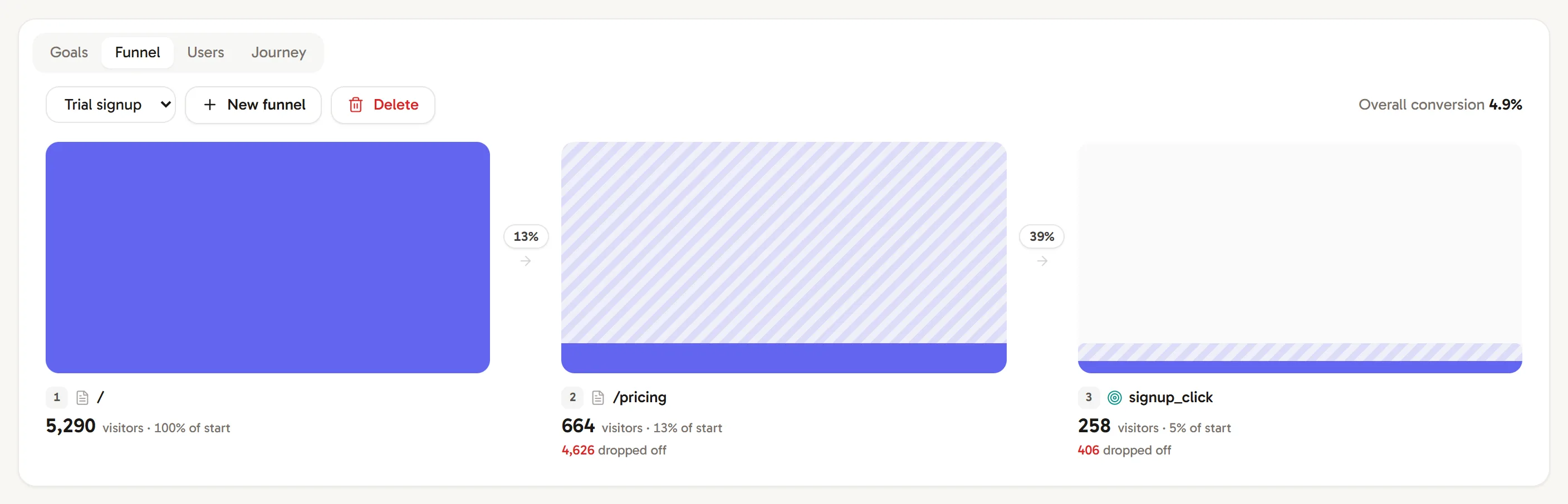
Read a funnel
Each step shows:
- the visitors who reached it, and their share of those who started the funnel (of start),
- the percentage that continued from the step before, between the bars,
- how many dropped off since the step before.
Overall conversion, at the top right, is the share of visitors who started the funnel and completed the last step.
Visitors must complete the steps in order, within the selected period. Change the period at the top of the dashboard to compare months, and add filters (a channel, a country, a campaign) to see how a funnel performs for one audience.
Manage funnels
- Switch between funnels with the menu at the top of the Funnel tab.
- Delete removes the selected funnel. Your visit data is not affected.
- Workspace owners, admins and website managers can create or delete funnels; viewers see the results.
If you see "Funnels are not part of your plan", the workspace's plan doesn't include funnels. See Plans, billing and usage limits.
Frequently asked questions
Do funnel steps have to happen in the same visit?
No. A visitor counts for a step when they complete it after the previous steps, at any time within the dashboard's selected period.
Can a funnel mix pages and goals?
Yes. Each step is either a page or a goal, for example / → /pricing → the checkout_click goal.
Can I edit a funnel?
Funnels can't be edited. Create a new one with the changed steps and delete the old one; nothing is lost, because funnels are calculated from your recorded visits each time you open them.